AAG Mobile App User Manual

With the AAG mobile app, users can view everything in the program in addition to easily creating a digital calendar of events; browsing sessions by specialty group sponsorship, date, time, and presentation type; receive up to the minute notifications on schedule changes or coffee breaks; and see a list of people who are attending the annual meeting. Whether you are brand new to the AAG mobile app or you are looking for more information on how to use the app, this guide will offer detailed instructions.

Getting Started — Download and update your app

Mobile app QR code to download the appThe AAG mobile app is currently available for all major smartphone brands such as Apple iPhone, Samsung, Google Pixel, and LG. To download the app for your smartphone, visit your app store and search for “AAG Meetings” or follow this link from your phone. For tablet devices, either visit the app store and search for “AAG Meetings” or visit the same link as you would for downloading the app to a smartphone. If you do not have a smartphone, have a Windows phone or table, or prefer to use a laptop, the AAG mobile app can also be used on a Windows phone/tablet or any laptop with this link: https://app.core-apps.com/aagam2026. Bookmark the link to easily return to the app on your laptop!

Once you have downloaded the app, open it to see the list of AAG Meetings and click on the meeting to open the program of your choice. The latest is listed first.

You will need to log in to access the program. All annual meeting registrants receive an email with instructions. PLEASE NOTE: you will NOT use your own AAG password to access the mobile app, but one that AAG has chosen and shared in the instructional email. If you are registered for the annual meeting and didn’t get an email or are having trouble logging in, please contact [email protected].

If you have previously installed the app and you want, you may need to click on the button that reads “Exit to Meeting List” from the home screen of an old program to reach the list of all programs installed within the app. Once you are on the screen that shows the list of AAG Meetings, click the circular arrow button in the top right hand corner to update your app (this arrow button should be RED in color if it is not yet updated). After the app has been updated, click on the program you wish to browse.

Install the program by clicking the install button, then click the blue Open button to open the program.

Note: The first time you open the program, it may need to download updates. This could take a few minutes. Please install the app before attending the meeting and when you are connected to Wi-Fi to ensure the fastest initial download time. Upon opening the app for the first time, you will also be given helpful tips about where to find information in the app. Click Next after reading these tips. There will also be a button available to click if you no longer wish to receive these types of tips.

The Program is Installed! Now what? (The Basics of the App)

Basic features of the AAG app include the ability to set up an electronic calendar of the sessions you plan to attend, browse the program and schedule of events, search for a specific participant or event, and view the maps of the conference venues. If at any time the circular arrow button in the top right corner of the app (under the magnifying glass) turns red, this means that there is an update to the app! Click on the circular arrow to install the updates.

The Home screen of the AAG app is the first screen that will open when the app is launched. Along the top of the app, you will find the quick keys. These are shortcut buttons to take you to the frequently used features of the app. The button shaped like the House will return you to the main app screen. Use this button if you want to return to the main screen at any time. The next button to the right, shaped like a ticket window, is the list of exhibitors who will have a booth in the exhibition hall during the annual meeting. Continuing to the right, the button shaped like an easel, is the list of sessions during the meeting. The fourth button from the left on the top, with the number 19 on it, is your personal calendar. The button that looks like a page is the list of presentation abstracts. Finally the magnifying glass is the search button.

Below the advertisements on the Home screen Yellow bars will appear when you have a new message or when there is an upcoming event on your calendar. Clicking on the Yellow bar with the Caution symbol brings you to your recent messages. These are alerts that might contain useful information such as room changes or coffee breaks. The number next to the Caution symbol tells you how many unread messages you have. The Yellow bar with the calendar icon shows any upcoming events that you have added to your calendar (more below). Click on this bar to see the event.

Below the Yellow announcement bars are a variety of icon buttons that bring you to different features of the app. The basic features of the app will be explained below and include the Calendar, the Sessions, the Search, and the Maps.

The Calendar (My Schedule) button can be found both at the top of the screen and further down the screen. It looks like a flip calendar and has the number 19 on it. This feature allows users to create their own personal schedule of events from the sessions that they are browsing in the app. When you first open the app, the calendar will have nothing on it. As you browse sessions, click on the star icon next to any session you think looks interesting and would like to attend. These sessions are then automatically added to your calendar. It is also possible to add your own events to the calendar. To do this, click the + icon in the top right. From here, add a title, location, date, time, and duration of the event you would like to add to your calendar then select ‘Done’ in the top right. Events that you add to your calendar will be colored in blue while events that are added from the AAG Program are colored in purple. To browse your calendar, click on the date you would like to see at the top of the screen, then scroll down through the times to see all of your scheduled events. For a list view of your events, click on the icon that has the three dots and three lines. The alarm clock icon takes users to a list of all of the events that are currently happening at the annual meeting at the time of clicking on the icon.

To browse sessions in the AAG Annual Meeting program and to add them to your calendar, click on the Sessions button. This button looks like an easel and can be found both at the center top of the screen as well as further down the screen on the left hand side. Once you click on the sessions button, a screen will appear asking how you would like to browse the session. Browsing by Day allows you to look at all the sessions occurring on a particular day that you choose from the dates listed at the top of the screen. These sessions are organized by time and are alphabetical. Browsing by Session Type allows you to look through sessions based on the type of session it is: Illustrated Paper, Interactive Short Paper, Meeting, Panel, Paper, Plenary, Poster, or Special Event. These are then organized by date (select the date you would like to browse at the top of the screen), time, and alphabetical. To browse a session by specialty group sponsors, select Browse by Sponsor Group. This will produce a list of all of the specialty groups and sponsors. Select which sponsor you would like to browse, then select if you would like to browse those sponsored sessions by day or by session type. Lastly, you can browse by Theme to see sessions related to the three AAG Annual Meeting Themes. Browsing by Theme also allows you to browse by day, session type, and sponsor group after selecting your theme of choice. Click on any session while browsing to learn more about the session, including the session description, organizers, and presenters, and presentation titles. To automatically add a session to your calendar, click on the Star on the left. To learn more about the presenter and read their presentation abstracts, click on any presentation in the session agenda. You can also save individual presentations to your calendar instead of entire sessions by looking at the presentation abstract and selecting the Star icon on the left.

The Magnifying Glass shaped icon lets you Search for anything throughout the entire AAG Program. Simply search for the last name of a presenter, a keyword, or an event title in the search box after clicking on the Magnifying Glass. The search results will be displayed below the search bar. Click on any of the results for more information.

Lastly, the Maps icon (this looks like a small 9×9 grid of squares and can be found in the middle of your screen) contains floor plans of the conference hotels as well as a walking map of the main street routes between the AAG meeting hotels. For the hotel floorplans, any of the rooms that are highlighted in orange are rooms being used for the AAG Annual Meeting. If you click on any orange colored room in the floor plan, it will take you to a list of all of the sessions that will be taking place in that room during the conference, organized by date and time.

The above information explains the basic functions of the AAG Mobile App. Using these basic functions will give you everything that the printed program provided, in a faster and more convenient way. It also gives you the ability to easily make a digital calendar of events to attend and find your way through the hotels using the floorplan maps. For more advanced features of the app, continue reading.

Basics, schmasics. I want to know more! (Advanced App Features)

For those app users who want to explore every inch of what the AAG Mobile App has to offer, this section includes additional features of the app beyond the basics. In this section, learn how to create a personal profile and add friends, use multiple devices, read the front matter of the AAG Program and other essentials, read conference abstracts, see lists of presenters and attendees, take notes, read daily Geograms, find your current location, browse a list of exhibitors, and view social media feeds.

It is possible on the AAG Mobile App to create a personal profile such as what you might find on LinkedIN or Facebook. This profile can then be made publicly available to everyone using the AAG Mobile App or used to connect to friends and colleagues. There are multiple ways to set up your personal profile. Either click on the three diagonal lines on the upper left side of the app to open the Message Center and then click at the top to set up a profile or click on the gear icon on the upper right hand side of the app to open the settings and select “MyProfile.” Once in your profile, add your name and any other information you wish. If it is easier, the icon with the arrow in a circle in the top right allows you to import a profile from another site such as LinkedIN. If you would like your profile to be publicly available to others using the AAG Mobile App, make sure that the box is checked next to the phrase: “Tap here to publish your profile to the Attendees list to engage with others users of the app.”

To see who else has created a profile in the AAG Mobile App, select the icon on the Home screen labeled Attendees that has a picture of the two human profiles. This gives you an option to browse all the attendees who have made a profile or to browse attendees by type of attendee (First Timer, Session Chair, Session Organizer, or Student). Connect with people by selecting their name and hitting the “Request Friend” button. After the person you requested to be your friend approves your request, you can send them a message, share your calendar, share notes, or request a meeting all through the app! Simply hit the three diagonal lines in the upper left corner of the app Home screen to open the Message Center and view your list of friends. Click on a friend to open their profile and view the options at the left: envelope (send message), paper and pencil (share notes), calendar (see their schedule after it has been shared with you), ID card (add to address book), trash can (delete friend), hand shake (invite to a meeting), or question mark (help screen).

If you do not want to publicly make your profile available or you know someone who does not have a public profile, you can still add them as a friend on the AAG Mobile App using a friend code. When you click the three diagonal lines from your Home screen to open the Message Center, there will be an icon labeled “+ Add a Friend.” After you click this, you have the option of entering a code that your friend gave you or finding out what your friend code is to give to a friend. The friend code option is only necessary for those app users who do not have a public profile.

To use the AAG Mobile App on multiple devices and be sure that all of your information syncs to each device, Multi Device Sync must be set up. To set this up, first go to Settings on your primary device by clicking the gear icon in the upper right. Scroll down to Multi Device Sync and select First Device. Enter in your email address and a password. On your additional devices, open the settings by selecting the gear icon in the upper right. Scroll down to Multi Device Sync and select Additional Device. Enter the same email address and password that was used for the First Device. After this step is complete be sure to update your app on all your devices by clicking on the circular arrows in the upper right of the Home screen. Your devices should now all be synced to each other and any information added to one device will appear on all of your devices. If for some reason you do not see information being synced, double check that you are logged in on the Multi Device Sync screen in the Settings. Once you have checked that you are logged in, update the app on all devices.

The remaining buttons on the AAG Mobile App access additional information useful for the AAG Annual Meeting. The Abstracts button is similar to the Sessions button, but allows users to search through all of the abstracts submitted for the Annual Meeting. The Presenters button provides a list of everyone who will be doing a presentation at the Annual Meeting. The Presenters button is different than the Attendees button because the Attendees button only contains those who have created a personal profile on the AAG Mobile App and made their profile public whereas the Presenters button is anyone who is presenting at the conference. The Essentials button contains files of useful information typically found in the front matter of the printed program such as information about the Jobs and Careers Center, the Newcomers Guide, Session Chairs instructions, Student Networking Happy Hour, and other information. The Exhibitors button provides a list of those who will have a booth in the Exhibition Hall. Exhibitors can be starred similar to individuals or sessions and saved under the My Favorites button with anything else you have starred in the app. The Social Media button shows you the current X and Instragram feeds, the AAG Facebook page and the AAG YouTube channel. The Membership button navigates to the AAG website that contains more information about renewing and benefits of an AAG membership. The Locate Me button helps you find your way if you are lost. Type in a room that you are standing next to and the app will show you where you are on the hotel floor plans. Lastly, the Notes button lets you see any notes you may have taken about a session. It also allows you to add a note to save for later.
    Share

Harlem of the West: Jazz, People, and Place in the Fillmore

By Mirembe Ddumba

Stand on Fillmore and Geary streets on a Saturday evening, and you can almost hear it. Neon humming against the dusk, a saxophone warming up behind a church door, the ghost of Billie Holiday’s voice floating between the streetlights. In these few streets, jazz wrote itself onto San Francisco’s grid.

The sound arrived by train.

The Sound of Migration

During World War II, African Americans from Louisiana, Texas, and across the South boarded trains bound for San Francisco’s shipyards. Between 1940 and 1950, the city’s Black population grew tenfold, from 4,800 to 43,000, filling apartments left empty when Japanese American families were forced into internment camps.

Musicians arrived with guitars slung over shoulders, horns wrapped in cloth. They transformed twenty blocks into the “Harlem of the West.” By the late 1940s, you could walk Fillmore Street on any night and hear Dizzy Gillespie bleeding through one door, smell barbecue from the next, watch Cadillacs pull up to drop off couples dressed for Jimbo’s Bop City.

Bop City at 1690 Post Street ran after-hours sessions until sunrise. Charlie Parker traded choruses with Dexter Gordon while Billie Holiday sat in a corner booth. Down the street, Ella Fitzgerald sang at the Champagne Supper Club and tried on hats between sets. The Blue Mirror. Club Flamingo. Jack’s Tavern. Two dozen venues within one square mile, each separated by a five-minute walk.

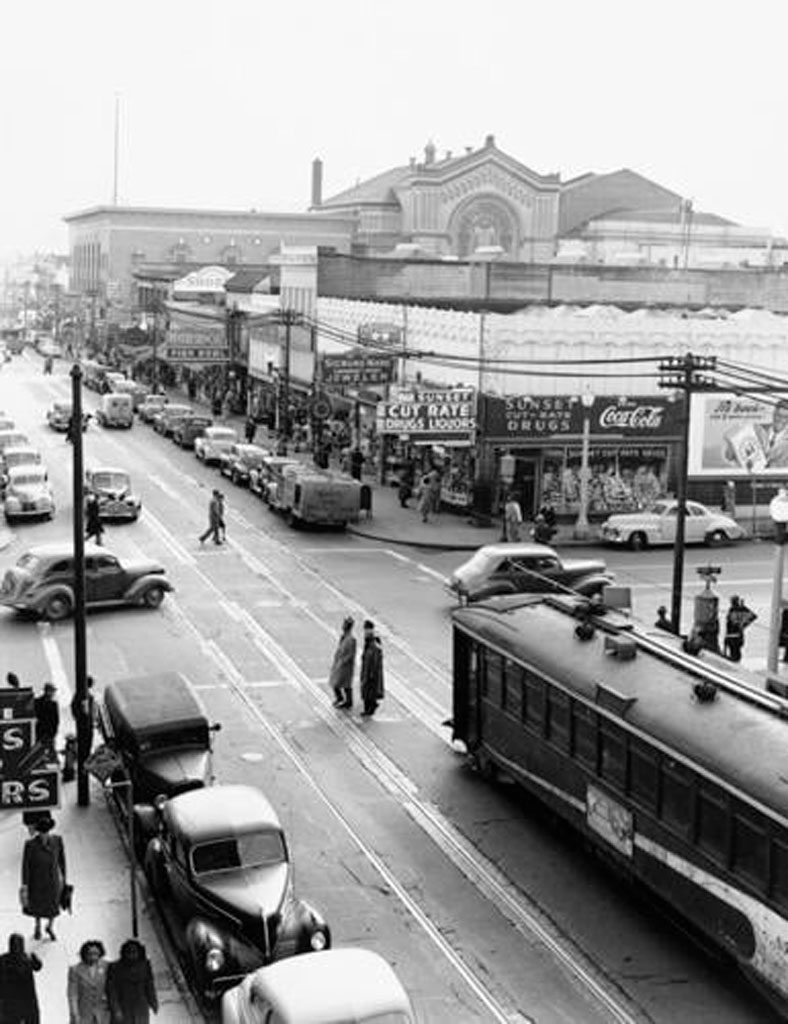
John Coltrane, Duke Ellington, Count Basie, Louis Armstrong, and Thelonious Monk rented rooms above the clubs, ate at soul food diners, bought records at local shops, and shaped the neighborhood’s sonic identity night after night. This wasn’t accidental. The grid itself made it possible.

Black-and-white photo showing Fillmore Street, south of Post Street, late 1940s. The neighborhood’s dense grid and constant traffic fueled the energy of the "Harlem of the West." Credit: David Johnson
Fillmore Street, south of Post Street, late 1940s. The neighborhood’s dense grid and constant traffic fueled the energy of the “Harlem of the West.” Credit: David Johnson


Geography as Destiny

The Fillmore’s layout made this density possible. Narrow Victorian storefronts, twenty feet wide, meant multiple clubs per block. Short blocks with corner entries created constant foot traffic. The 22-Fillmore streetcar brought audiences from downtown, turning the neighborhood into one continuous jazz experience.

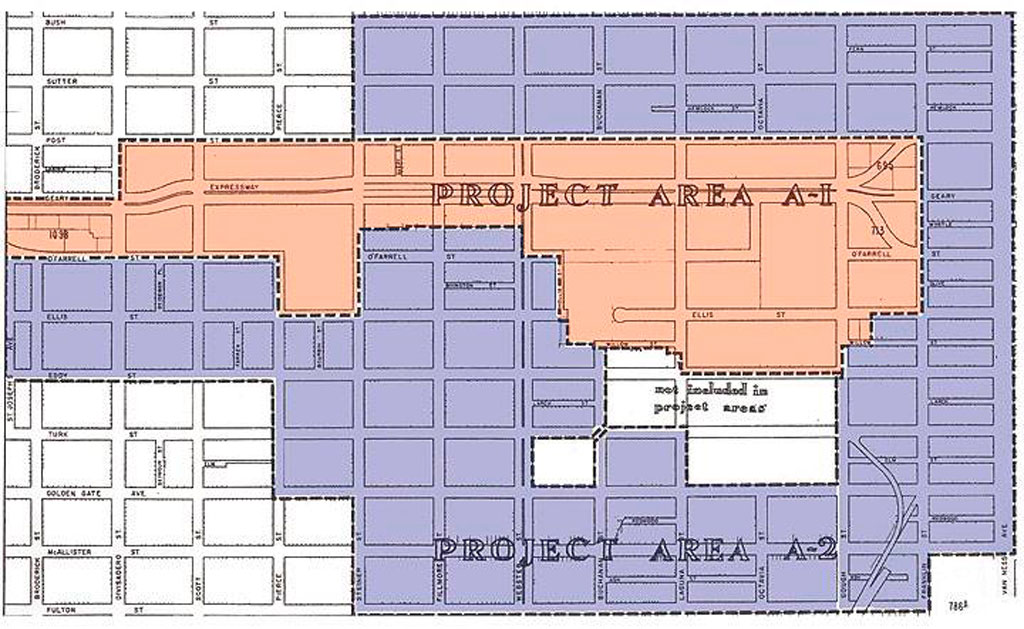
In 1948, city planners declared the Fillmore “blighted.” Under Redevelopment Agency director M. Justin Herman, bulldozers arrived. The Western Addition A-1 and A-2 projects demolished Victorian homes and shuttered clubs across 104 blocks. Geary Street, once lined with music venues, became Geary Boulevard, a four-lane expressway cutting the neighborhood in half.

By 1964, authorities had displaced 4,000 residents from A-1 alone. Jazz musicians scattered to Oakland, the East Bay, and Los Angeles. Residents gave urban renewal a different name: “Negro Removal”.


You could go out on Friday night and not come home until Sunday night because there is so much to do.”

Elizabeth Pepin Silva, filmmaker and author of Harlem of the West


The clubs closed. The musicians left. But the music never completely died.


Map showing Western Addition redevelopment zones A-1 and A-2, which demolished 104 blocks and displaced thousands of residents. Credit: San Francisco Redevelopment Agency archives
Western Addition redevelopment zones A-1 and A-2, which demolished 104 blocks and displaced thousands of residents. Credit: San Francisco Redevelopment Agency archives


Still Playing

Walk Fillmore Street now, and commemorative plaques mark where Bop City stood, where the barbershop was, where musicians bought their reeds. Listen closely, though. The Fillmore Auditorium still books acts, its walls papered with decades of concert posters. Calvary Presbyterian Church hosts Sunday jazz services. Jones Memorial United Methodist Church opens its doors for Friday night sessions.

Every July since 1986, the Fillmore Jazz Festival closes twelve blocks to cars. Over 50,000 people flooded the streets for two days. Five stages. Artisan booths. The smell of Ethiopian food mixing with New Orleans-style barbecue. For one weekend, the neighborhood becomes what it was, pedestrians moving from stage to stage, music echoing off Victorian facades.

On other nights, the music lives in smaller rooms. 1300 on Fillmore books jazz acts in an intimate room with velvet couches. The Boom Boom Room sits on the corner where John Lee Hooker used to own a club. Rasselas Ethiopian Restaurant serves injera and hosts live music Thursday through Sunday. The building that housed Jimbo’s Bop City was literally picked up and moved two blocks west. It’s Marcus Books now, an Afrocentric bookstore that archives what redevelopment tried to erase.

Stand at Fillmore and Geary on Saturday evening. Close your eyes. Past the bus engines and car horns, you can still hear it. A saxophone warming up. The ghost of a neighborhood that jazz built, that policy tried to destroy, and that memory refuses to let die.

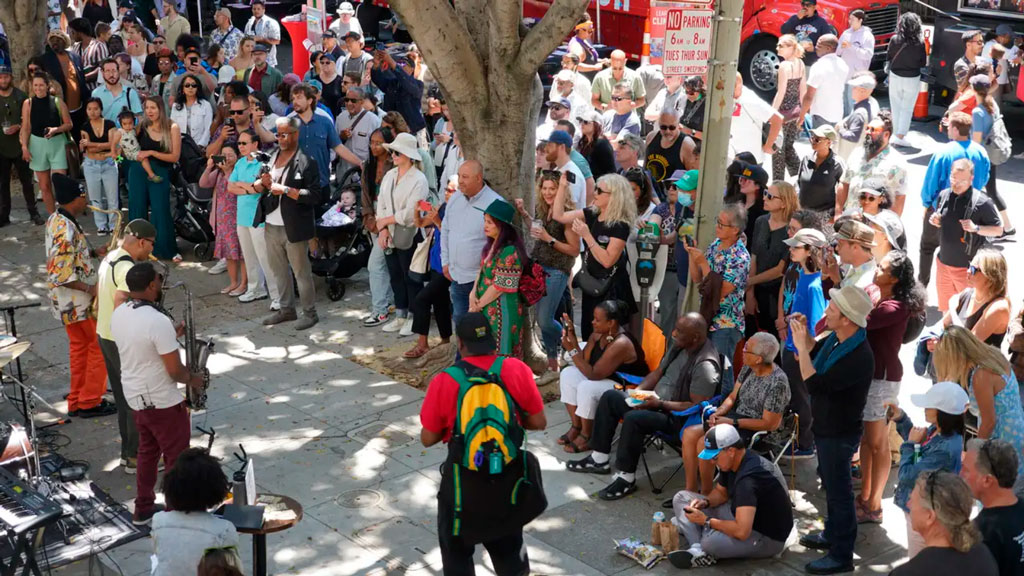
Photo showing an overhead view of musicians playing to a packed crowd at the Fillmore Jazz Festival. Credit: Fillmore Jazz Festival
Musicians play to a packed crowd at the Fillmore Jazz Festival, which brings over 50,000 people annually to celebrate the neighborhood’s musical legacy. Credit: Fillmore Jazz Festival


Learn More
    Share

The Hills of San Francisco

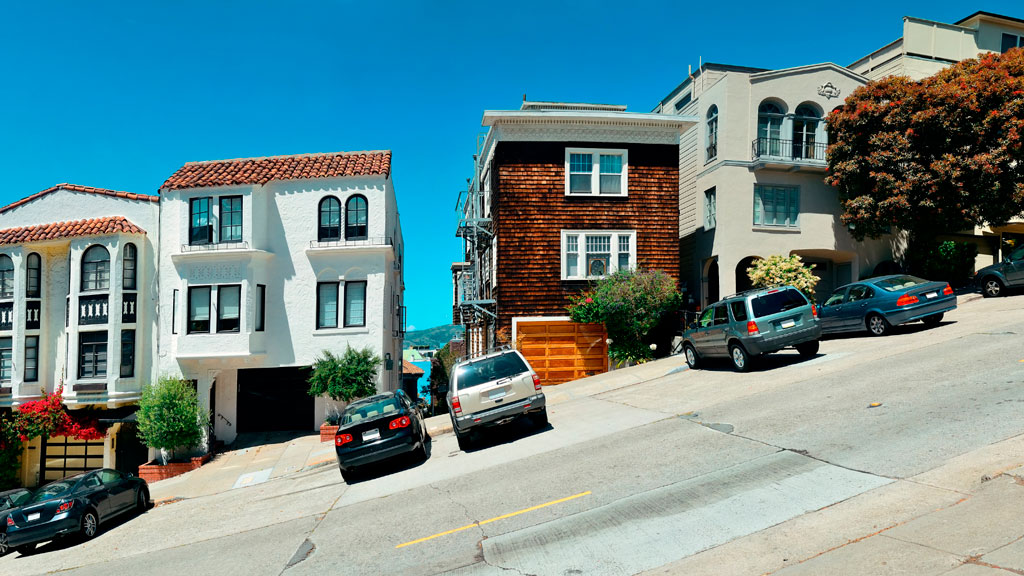
Street hill gradient showing homes built on a slope with cars parked on the deeply slanted street.
Street hill gradient in San Francisco

Unlike the rest of California, San Francisco has a unique geography that shapes its weather and settlement patterns. The city is set on the tip of a peninsula halfway up the coast of northern California, surrounded by bodies of water on three of its sides: the Pacific Ocean, the Golden Gate strait, and the San Francisco Bay. The city is laid out over hills that stretch from coast to coast, reaching heights of nearly 1,000 feet, making the climate similar to coastal areas on the Mediterranean.

The hills of San Francisco define its topography and culture. It’s hard to pinpoint the exact number in the city, but many sources consider there to be more than 50 named hills. As Pulitzer Prize-winning San Francisco Chronicle columnist Herb Caen notes in his introduction to the Hills of San Francisco, no one can quite agree on which [hills]. Although it’s debated among locals, there are seven hills that are iconic to the city: Russian Hill, Nob Hill, Telegraph Hill, Twin Peaks, Mount Davidson, Mount Sutro, and Rincon Hill.

So, when is a hill a hill? Self-proclaimed San Francisco explorer Dave Schweisguth claims, “When it’s a lone mountain. That is, if you can walk all the way around it, always looking up to its summit. It’s not so clear cut when hills run together into a ridge, which most of San Francisco’s do. Height alone is not so important: a very small hill may be perfectly obvious, while a string of higher summits may be hard to tell one from the next. It’s easier to call a hill a hill if it’s separated from its neighbors — if, on a topographic map, a contour line or two traces all the way around its summit.”

The Range of Iconography

Originally named Blue Mountain for the wildflowers that cover the hillside, the city’s tallest hill was renamed Mt. Davidson at the urging of the Sierra Club in 1911, after George Davidson, the geographer who surveyed it. It is the focal point of San Francisco’s Mt. Davidson Park, with a forest that accounts for more than 30 of the park’s acres, quietly remaining an oasis in the most densely settled city in California. Defined by a 100-foot cross at its peak, Mount Davidson stands at an elevation of 928 feet. Urban hikers share that despite how small the overall area is, the trails aren’t consistently marked, which causes explorers to get lost in the woods.

Hikers also recommend Mount Sutro, located in central San Francisco, for its role in the city’s cultural and natural history. Its century-old trails are now preserved by the University of California, San Francisco, which guides the long-term restoration of the 61 acres and protects the ecological oasis in the heart of the urban environment, along with the citizen group Sutro Stewards. The city’s elevation and abundant summer fog contribute to the mountain’s microclimates and its plant and wildlife communities.


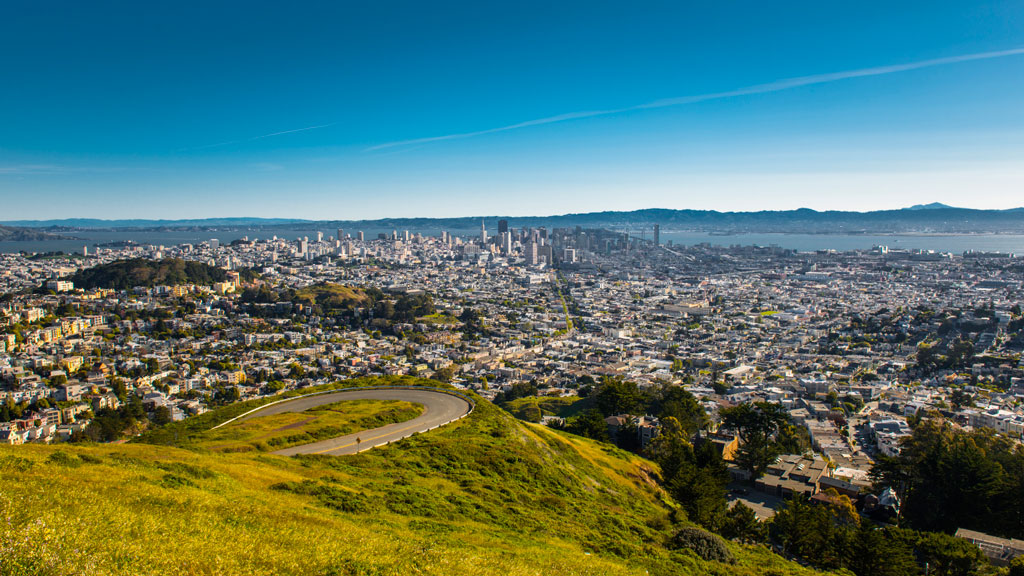
View of San Francisco from Twin Peaks showing the city skyline wrapping around several hills
Twin Peaks view in San Francisco. Credit: optionm, Getty Images


Originally called “Los Pechos de la Choca” (Breasts of the Maiden) by early Spanish settlers, Twin Peaks is a main landmark of San Francisco’s skyline, reaching elevations of 910 and 922 feet. Similar to Mt. Davidson and Mt. Sutro, Twin Peaks hosts a 64-acre park of coastal scrub and grassland communities that offer an idea of how San Francisco’s hills and peaks looked before development changed them forever.

Early in defining San Francisco’s history, Nob Hill, Russian Hill and Telegraph Hill continue to remain among the most popular neighborhoods to visit.


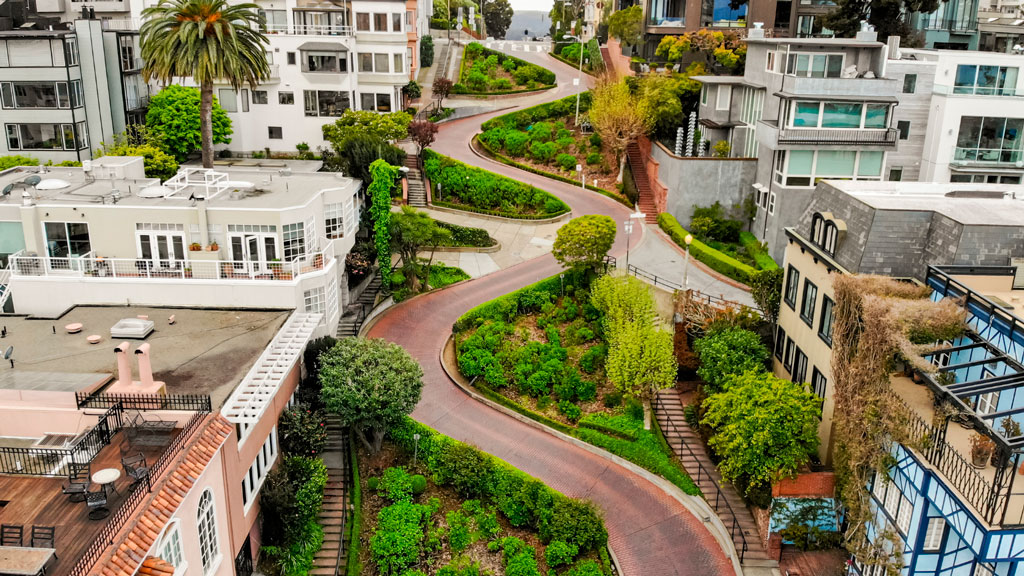
Aerial photo showing the curve of Lombard Street winding down the hill between homes
Lombard street in San Francisco Lockdown. Credit: Tiago Ignowski, Getty Images


Russian Hill’s name dates to 1847 when Russian sailors were buried on the hill during the gold rush in the 1800s. The burial sites are long since deeply covered, and it’s now only possible to admire a plaque at the site where the cemetery once stood. This is the same neighborhood home to the famous Lombard Street, that draws tourists from around the world due to its scenic switchbacks and postcard views. Because the slope in this area reaches 27° (51%), 8 hairpin bends were put in the 1300 feet between Hyde Street and Leavenworth Street to allow cars to drive down the street, ultimately creating one of the most winding streets in the world.

Russian Hill borders Nob Hill to the south, one of the city’s most upscale neighborhoods.  Originally called California Hill (after California Avenue, which runs right over it), Nob Hill got its name from the word “nabob” that originated from the Hindu word meaning a wealthy or powerful person. This affluent neighborhood was home to the Central Pacific Railroad tycoons known as the “Big Four,” who were among the first to build their mansions here.


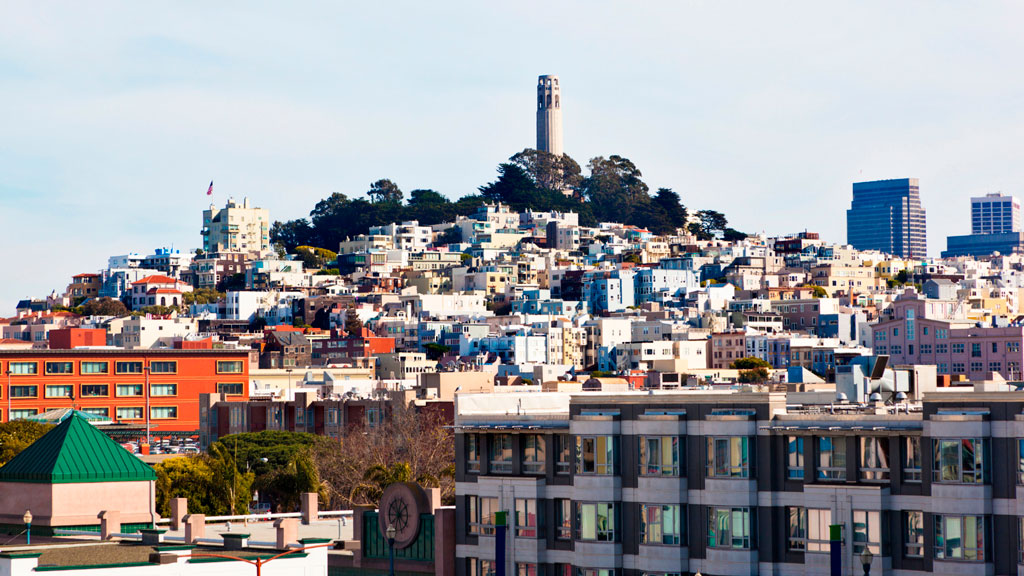
View of Telegraph Hill from below showing buildings and homes rising up to the tower atop the hill.
View up to Telegraph Hill’s Coit Tower. Credit: slobo, Getty Images Signature


Telegraph Hill hosts Coit Tower, an iconic piece of architecture that resembles a fire hose and affords incredible views of the city; its walls are also home to historic artwork. Originally, the Tower was a windmill-like structure created in 1849 to signal ships entering the Golden Gate. Once the trek is completed, the summit provides a breathtaking panoramic view of the city with landmarks like the Golden Gate Bridge, Alcatraz, and the Transamerica Pyramid.

Whether you’re taking a leisurely stroll or hiking the steepest routes, you can recall the words of the iconic San Francisco journalist Herb Caen, who once said, “Take anything from us — our cable cars, our bridges, even our Bay — but leave us our hills.”

You can hit the trails with a guided tour or explore the city on your own. The SF Gate compiled a list of 11 hikes within the city limits that allow visitors and residents to get to know the landscape. An interactive map created by a UC Berkeley graduate student studying urban planning maps SF’s slopes and uses simple color coding to show where the flattest pockets of land are. If you’ll be attending AAG’s 2026 Annual Meeting in San Francisco, you’ll want to bring your walking shoes!

    Share

A Student’s Guide to the AAG Annual Meeting

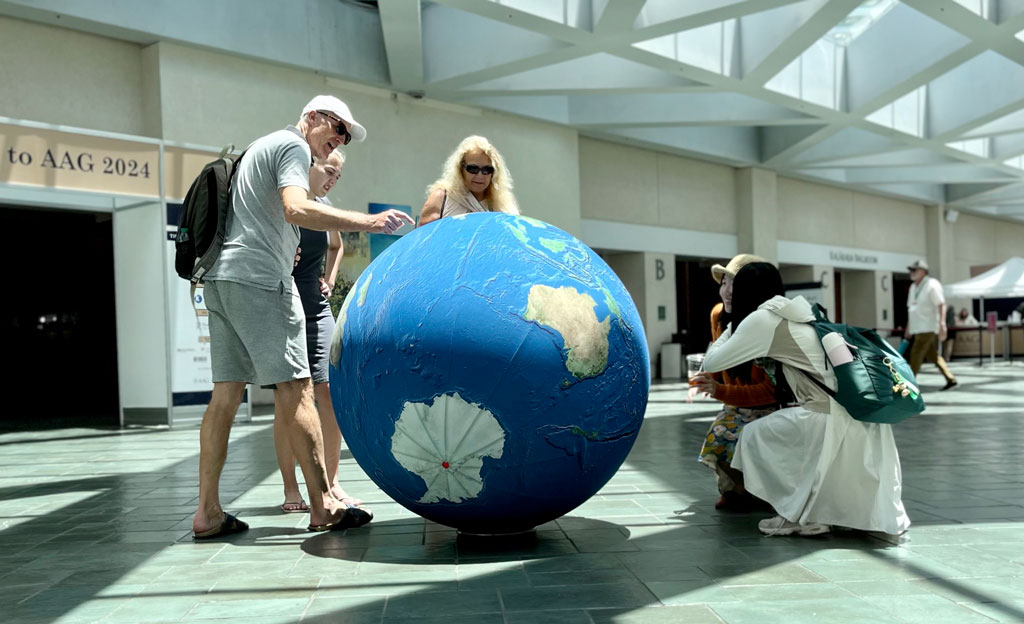
AAG annual meeting attendees interact with AAG's giant inflatable globe during a break in the conference.

Attending an annual conference can be confusing and intimidating; regardless of whether you’re a first-time undergraduate attendee or a seasoned postgraduate student. At AAG, we want to do what we can to provide you with advice to cover all aspects of the Annual Meeting. Although this isn’t a comprehensive checklist, here are some tips and tricks to make the experience as seamless and enjoyable as possible.

Preparing for the Meeting

Travel, Lodging, and Packing

There are many factors to consider in deciding where to stay, including cost, proximity to the meeting venue, and desired experience (e.g. access to a kitchen, neighborhood vs. downtown, ability to share accommodations). Different kinds of lodging offer different advantages: the conference hotel, nearby hotels, or an option such as AirBnB or VRBO. However, AAG does reserve discounted rooms in a nearby conference hotel at each annual meeting. Understandably, attendees will seek the best deal for lodging. Students can pool their expenses together and stay in accommodations with each other.

Note details about the local airport or train station you’ll be arriving in, and public transportation options. AAG tries to select conference locations that are walkable, with good public transportation, and we share what we learn about local transportation options in our conference information.

If it’s your first time attending a conference, consider this packing list from Rebecca Rice, author of PhD in Clothes, who provides guidance about work-life balance, professionalism, authenticity and style on the academic career path.  Make sure to pack shoes for easy walking—you’ll be doing a lot of walking even just inside the conference center. Think about the field trips and excursions you’d like to do, and pack shoes and outerwear for them.

Building your presentation

Whether you’re presenting a paper, poster, or attending a panel discussion, start building your presentation early. Ideally, working with a mentor can help you tailor your presentation to communicate the necessary findings and next steps of your work. You may also consider asking your department faculty and staff about their experiences attending past academic conferences. Seasoned attendees often have secret hacks or insight gained from first-hand experience.

If you are presenting, host a small social practice session with fellow students and faculty. This will allow you to time the presentation to keep within the allotted limit and to practice without a script. A practice session can also present opportunities for your colleagues to provide feedback or propose possible questions the audience is curious about.

It’s important to note that presenting is not required; If you’re an undergraduate, attending a conference gives you the opportunity to hear a wider variety of viewpoints, and can help in giving you a better impression of the discipline as a whole.

Review the Program

The AAG Annual Meeting program will be released about a month before the start of the conference. Take advantage of the available information to plan out your daily schedule by checking out familiar names, sessions related to your interests and research or abstracts which sound interesting to you.

To one side of the online program (the right side in 2025), you can refine your search by session type, modality, sponsor groups, or a curated track, which is a compilation of sessions put together with a common theme or goal. From special sessions and workshops to networking events, you can find every event listed in the program. Don’t forget to download the AAG Meeting app to keep up-to-date on the latest changes of events, reminders, and meeting information. Consult our tip sheet for quick set-up and user guidance or delve more deeply into the functions of the app with our user guide.

Attending the Conference

Check In

When planning your trip, typically plan to arrive at the conference the day before it starts. AAG’s on-site registration will open the afternoon before the first day of the event, so you will be able to go to the venue and check in to collect your name badge. It’s crucial to wear your badge when attending any event affiliated with the meeting. This will often be your first introduction to and from other attendees as you familiarize yourself with others.

Day-by-Day

With a day long schedule, it’s recommended to dress comfortably, bring a water bottle, and a snack. With numerous keynote speakers, workshops, and panel discussions constantly ongoing, the meeting will feel hectic and confusing. Embrace the experience! Narrow in on sessions that call out to you and take the time to gain insights from presenters in your research niche. Engage in Q&A sessions, introduce yourself to other students, and don’t be afraid to ask for advice.

Networking doesn’t come easy, but with practice, it will come naturally over time. Students may take the time to prepare business cards and a brief elevator pitch about research interests or future goals. Get in touch with university professors and other students to start building a network of acquittances. Here are annual events that offer these opportunities. The best way to find these sessions are to filter the program by “AAG Events.”

  • Welcome Reception—The reception takes place on the first evening of the conference with drinks, bites, and space to mingle with other attendees.
  • Plenaries, Award Sessions, and Panels—With more than 1,000 sessions to choose from, it’s easy to get overwhelmed. AAG has several special types of sessions you can seek out in the program, from the special events to numerous awards sessions and plenary panels hosted by AAG Specialty groups.
  • World Geography Bowl—An AAG tradition is the World Geography Bowl, a fun, often fast-paced competition of student teams from AAG Regional Divisions. It’s a great opportunity to cheer on your peers, learn a few new things about geography, and mingle with other students.
  • Careers and Professional Development Center—Each year, AAG features a large track of over 50 panels, paper sessions, workshops, and networking events focused on career preparation and professional development for geographers. These sessions and events will take place throughout the entire conference in the Careers & Professional Development Center, a central hub for students, early-career professionals, job seekers, and other attendees to network and learn from professional geographers and develop strategies for finding employment in geography-related occupations.
  • Student Day—In addition to specialized offerings for students throughout the entire week, AAG works with student members to organize a full day of sessions dedicated to student research, methods training workshops, career planning & mentoring, and networking events and activities for students at all levels of higher education. Keep an eye out for the curated track and create your own schedule year after year.
  • Specialty and Affinity Group Business Meetings—AAG’s more than 75 specialty and affinity groups all have business meetings during the annual meeting. These meetings are usually small gatherings that provide excellent opportunities for you to discover an interesting community of your own—or several. The meetings are open to all AAG 2025 participants, and in fact many specialty and affinity groups see their business meetings as an important way to engage and recruit new members.

Conquer Your Fear of Missing Out

Take a break! Explore the area! It’s likely you won’t have time to attend everything you planned, and you may even skip an event you had slotted into your schedule to keep yourself from getting worn out. Many attendees are travelling from out of town, so this is an opportunity to connect with our host city. Specialty and Affinity Groups often organize field visits that align with their core interests that venture out to local neighborhoods, historical sites, or a hands-on engagement project. During the registration process, you can choose the workshops and field trips you’d like to participate in. If you are already registered, simply click the Register Now button on our website to access your registration and add events.

The Follow Up

Reflection and Outreach

As you travel home, take a moment to collect your thoughts. Make note of any interesting papers or suggested readings, save all contact details business cards, or make note of any plenaries that inspired you.

Remember our networking events? Follow up with new contacts after the conference to maintain relationships and explore potential collaborations. LinkedIn is a great way to maintain professional relationships as a network grows.

Take Advantage of AAG Resources

With your student membership, you can join a number of Affinity Groups or Specialty Groups that align with your research interests and stage of education. Specifically, the Community College, Undergraduate Student, and Graduate Student affinity groups strive to enhance the participation and representation of students within the organization and better prepare students for further study and careers in geography. Additionally, connecting with one of your nine Regional Divisions allows you to network with geographers and other members in an area located near you. Held annually each fall, Regional Division Meetings empower AAG members to connect around regional issues of significant importance.

Your membership also grants access to the AAG Job Board. If you’re looking to start your career in geography or transition to a new field or position, members can view hundreds of open positions from a variety of employers, upload a resume to help employers find you, and sign up for job alerts to be the first notified of open positions relevant to your job search or interest. If you’re looking to advance your education, explore our Guide to Geography Programs and Opportunities to take the important step to understand the different academic opportunities and how they align with your goals.

Read more about student resources
    Share

Sowing the Seeds for Food Sovereignty in Detroit

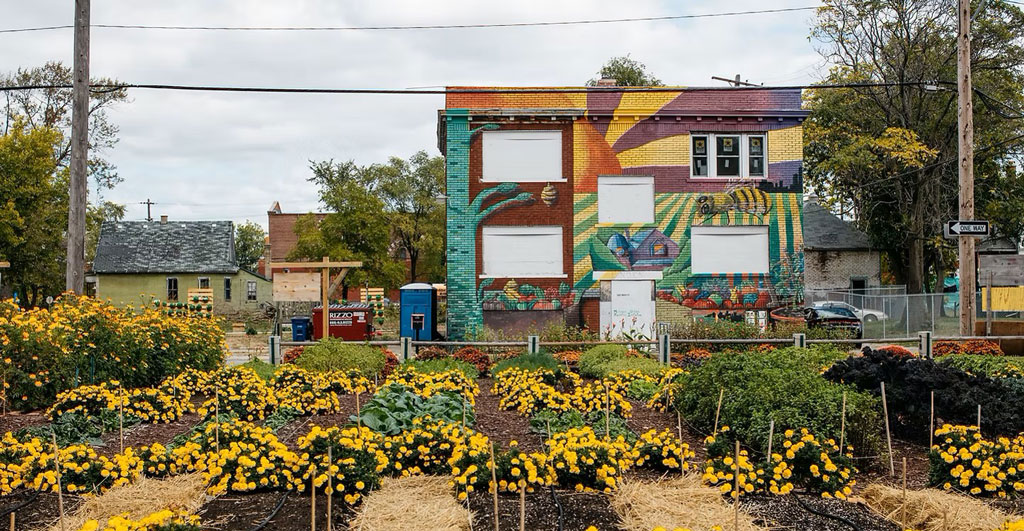
An urban farm plot of beds with crops and flowers sits in front of a building painted with an artistic mural, courtesy Michigan Urban Farming Initiative - MUFI
Photo courtesy Michigan Urban Farming Initiative (MUFI)

Urban agriculture is blossoming in Detroit, gaining recognition for its “green revolution,” through the rise of urban gardens and farms. With a total of 139 square miles or over 100,000 empty lots being vacant, this provides an opportunity to incorporate green spaces into communities throughout the city.

Urban gardening isn’t new to Detroiters. During the economic crisis of 1893, “Potato patches” helped feed hungry families and taught people how to grow their own food during times of social and economic crises. Later, in the 1970s, Mayor Coleman Young’s “Farm a Lot” program set an ambitious goal of transforming 3,000 empty lots into urban gardens. In the late 1960s the Black Panther party served breakfast to children in Black communities — highlighting the racialized gaps in funding from the United States government. The connections among community, mutual aid, and growing and providing food go far back in Detroit. Rather than working against each other, cooperatives and mutual aid programs ensure that groups can pull resources together to beat the system at its own game.

Detroit’s history of gardening, farming, and giving to neighbors shows how communities can move beyond food justice and into food sovereignty. Food justice addresses hunger at a basic level; food sovereignty takes it up a level to define, own, and dictate a food system. This in turn provides the earth with increased resilience to crises and climate impacts, in addition to promoting autonomy for communities. According to shakara tyler, co-executive director of the Detroit Black Community Food Sovereignty Network, part of creating a just society and systems means, “shifting from extractive economy and reinvesting into the regenerative economy.”

The growth of urban agriculture in Detroit is a testament to the resilience and innovation of its people. Initiatives such as the Oakland Avenue Urban Farm and Detroit Black Community Food Sovereignty Network are prime examples of how community-based organizations can catalyze change, serving as educational platforms for sustainable living. Explore gardens and organizations below to see how modern food sovereignty is inspiring Detroiters to create a deep praxis within other justice movements across local and state-wide levels.

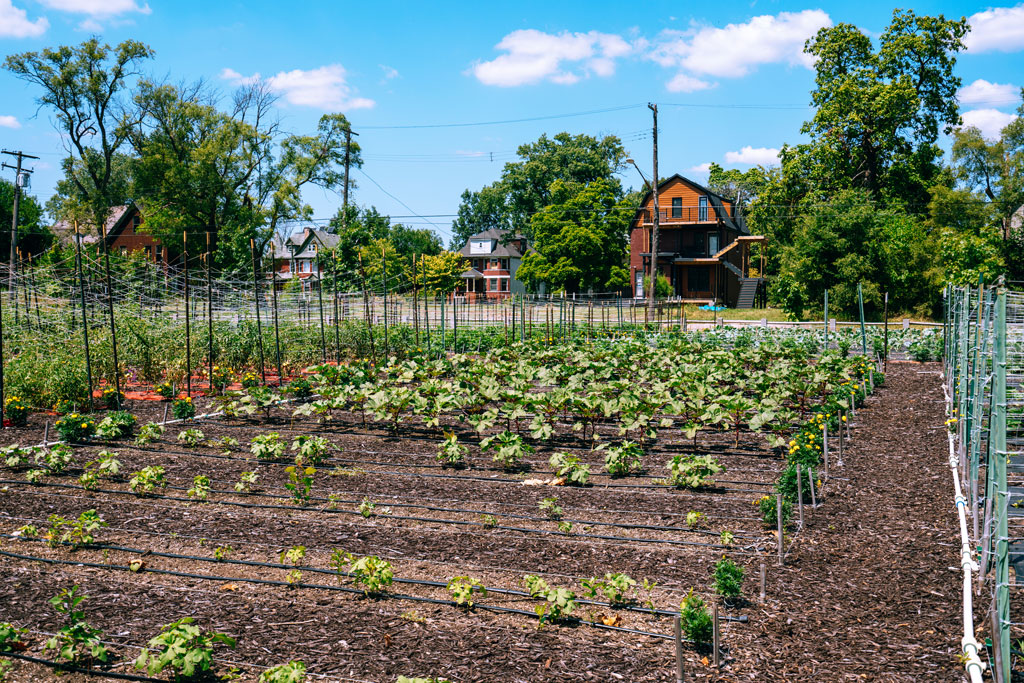
View of plants growing in beds in an urban garden plot in Detroit, Michigan
Urban garden plot in Detroit, MI


Michigan Urban Farming Initiative

7432 Brush St, Detroit, MI 48202

Based in Detroit’s North End community, Michigan Urban Farming Initiative’s (MUFI) redevelopment of a three-acre area in Detroit’s North End, is being positioned as an “epicenter of urban agriculture.” With the goal of creating a sustainable “agrihood” with multiple projects, the campus is divided into thirds: production farming, interactive agriculture, and hardscaped spaces, such as their Community Resource Center. Since operating out of their new headquarters, MUFI has been able to grow and distribute over 50,000 pounds of produce (grown using organic methods) to over 2,000 households within 2-square miles at no cost to the recipients.

Oakland Avenue Urban Farm

9227 Goodwin St, Detroit, MI 48211

Operating out of Detroit’s North End neighborhood since 2010, the Oakland Avenue Urban Farm (OAUF) is “cultivating healthy foods, jobs, and active cultural spaces.” The “Farm” grows over 33 varieties of vegetables and fruits and operates a “Harvest on Demand” option with local farmers markets, allowing neighbors to have consistent access to produce. In addition to partnering with local chefs and nonprofits to distribute tens of thousands of hot meals across the city, OAUF provides training opportunities, manages a community land trust, and brings together youth to improve learning and leadership skills.

Keep Growing Detroit

1445 Adelaide St, Detroit, MI 48207

Keep Growing Detroit (KGD) is working to cultivate a food sovereign city where the majority of fruits and vegetables consumed by Detroiters are grown by residents within the city’s limits. Their Garden Resource Program (GRP) supports urban gardening in the city by providing high-quality resources to family, community, school, and market gardens located in Detroit, Highland Park, and Hamtramck. Participants receive seeds, transplants, personalized garden assistance from staff, and a connection to an incredible network of gardeners, farmers, and advocates for a thriving food system across the city.

Detroit Black Community Food Sovereignty Network

11000 W Mcnichols Rd Ste 103, Detroit, MI 48221

Another non-profit that aims to amplify and create sustainable and equitable food systems is the Detroit Black Community Food Sovereignty Network (DBCFSN). The 7-acre urban “D-Town Farm” grows more than 36 different fruits, vegetables, and herbs with cultural and social significance, with the intention of farming what people want to eat and in high demand. Their work to shift the understanding of food, is a way to have sovereignty and learn about the importance of these systems. In addition to providing security, DBCFSN co-founded the Detroit Black Farmer Land Fund with KGD and OAUF to support rebuilding black land wealth. Since 2020, over 239 awards have been made to residents, businesses, and organizations.

North End Agri-Arts Alley

Currently under-going construction

In March 2023, the city announced four new Arts Alley locations in North End, Detroit. Specifically, the North End Alley will be the first Agri-Arts alley as part of a federal grant to transform dilapidated alleys into artistic oases. Anchored by the Oakland Avenue Urban Farm in partnership with artists from the Oakland Avenue Artists Coalition, this green alley will complement the Oakland Avenue Farmer’s Market, North End Resource Center, Oakland Avenue Cooperative Greenhouse, and Black Bottom Garden Center. Major construction is currently underway and is expected to be completed in late Spring 2025.

Urban farms and gardens are not just places to grow food; they are hubs of community activity, education, and empowerment. While the challenge remains to make these green spaces accessible to all, efforts are being made by the city to provide urban agriculture government guidance and infrastructure. In September 2023, the city of Detroit named Tepfirah Rushdan, former co-director of Keep Growing Detroit, its first director of Urban Agriculture. Over the past decade, the movement has seen substantial growth, transitioning from a few community gardens to a network of over 2,00 gardens and farms engaging nearly 20,000 Detroiters as of 2023.


Watch the webinar recording “Building Black Food Sovereignty in Detroit,” featuring shakara tyler, as part of our Preparing for the Detroit 2025 Annual Meeting webinar series.

You can register for the 2025 Annual Meeting field visit “Feeding a City: The Geography of Urban Food Systems” hosted by the Food and Agriculture Specialty Group to further explore Detroit’s urban food system landscapes.

    Share

History Painted in Place: Detroit Murals Map and Guide

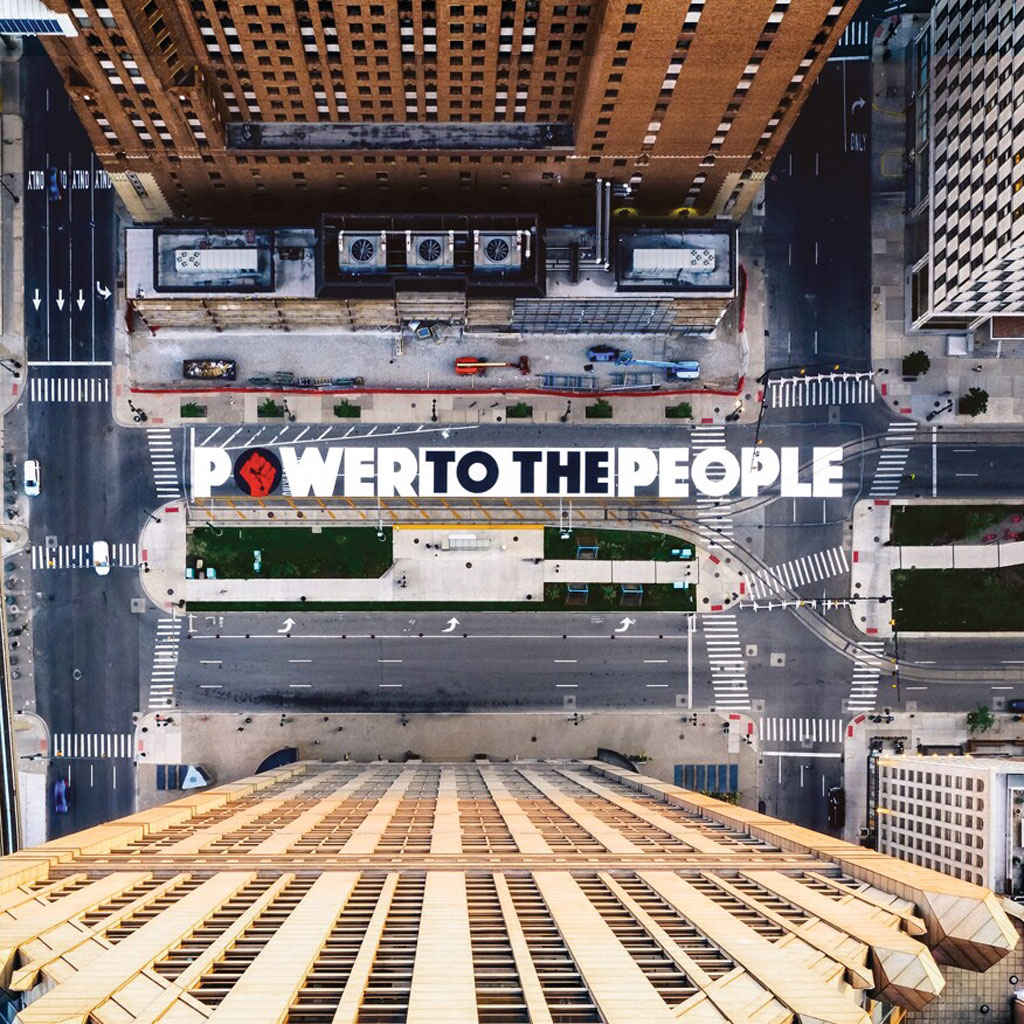
Power to the People mural captured in an image from above on Woodward Avenue in Detroit; Source: Joe Gall, courtesy Hubert Massey and Detroit Heals Detroit
"Power to the People" mural captured in an image from above on Woodward Avenue in Detroit; Source: Joe Gall, courtesy Hubert Massey and Detroit Heals Detroit

Just weeks after Detroit was named #4 in the United States for the creation of beautiful murals, the city’s Office of Arts, Culture and Entrepreneurship (ACE) took on the task of putting the city at number one. To accomplish this, in 2022 the city launched a mural map and app to identify every mural and artist in the city, based on hundreds of curated murals and biographies of artists.

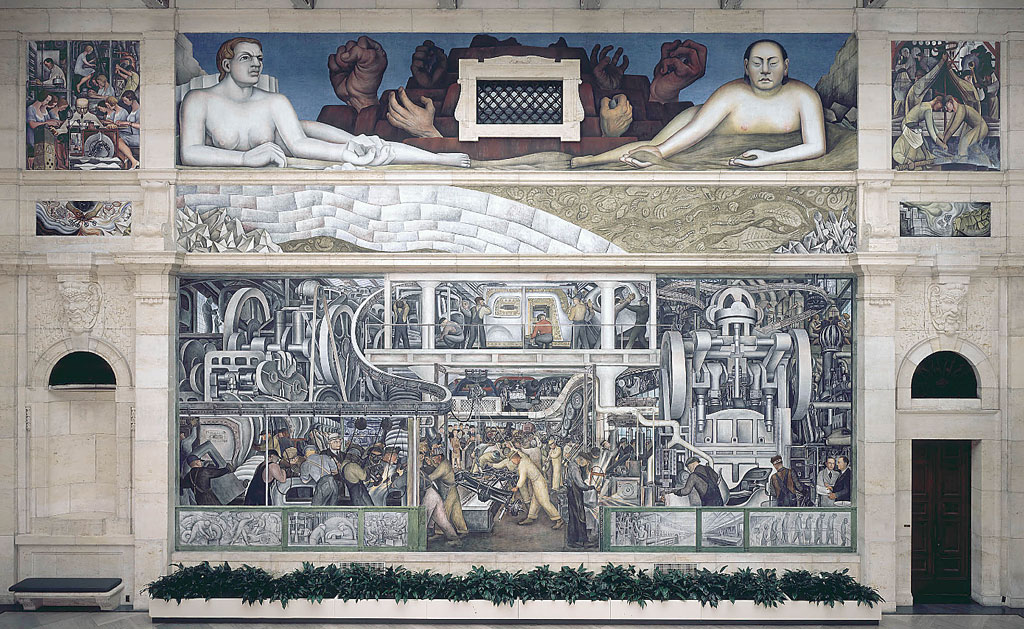
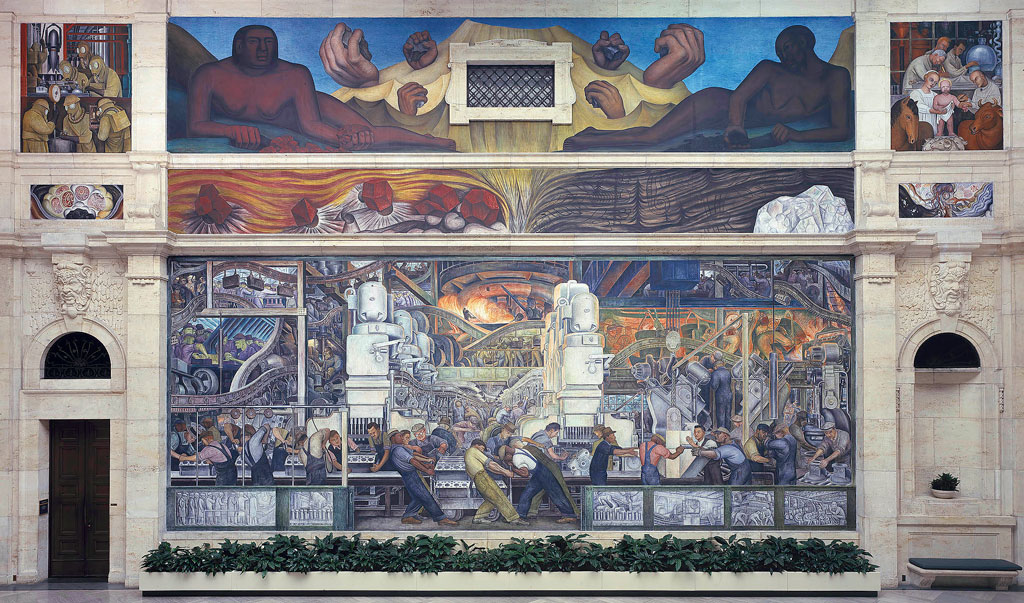
This initiative builds on a rich legacy of mural art in Detroit.  Mural art has left its mark as far back to the early 1930s, capturing almost 100 years of history in Detroit. As the city struggled through the transition of the Great Depression, the prominent Mexican painter and muralist Diego Rivera was commissioned by the Detroit Institute of Arts (DIA) to capture the energy of Detroit’s distinctive automotive, steel, and other industries. Often considered to be the most complex artworks devoted to American Industry, Rivera’s “Detroit Industry” murals depict the city’s manufacturing base and labor force on 27 panels, spanning all four walls of the DIA’s Diego Court.

Grand in scope and scale, the paintings celebrate Detroit’s auto factories and depict men of all races side by side on an assembly line. Rivera’s technique for painting frescoes, his portrayal of American life on public buildings, and the 1920s Mexican Mural Movement led to and influenced the New Deal mural programs of the 1930s and 1940s, in addition to the future generation of artists in the city.

The main two panels of his series draw inspiration from Ford’s River Rouge Plant, where Rivera toured and sketched for months before creating large-scale tributes to their workers along with a blend of critique and celebration of the forces of industry. He also blended ancient Aztec symbolism into his modernist treatment, creating allegorical figures to portray the complex relationship of human and machine.

A view of the south wall of the Diego Rivera Detroit Industry mural at the Detroit Institute of Arts


A view of the north wall of the Diego Rivera Detroit Industry mural at the Detroit Institute of Arts


The Detroit Institute of Arts’ Research Library, Archives, and Collection Information department holds the digitization of a collection of existing 8 x 10-inch (large format) nitrate photo negatives, which were taken in 1932–33 to document the making of Diego Rivera’s “Detroit Industry” murals. Their digitization preserves the history of the murals and makes the images accessible to the public. In addition, the film that Ford Motor Company’s team made of the artist at work is now accessible on the National Archives website.

Power to the People mural captured in an image from above on Woodward Avenue in Detroit; Source: Joe Gall, courtesy Hubert Massey and Detroit Heals Detroit
“Power to the People” mural captured in an image from above on Woodward Avenue in Detroit; Source: Joe Gall, courtesy Hubert Massey and Detroit Heals Detroit

Hubert Massey is a contemporary muralist whose work is inspired by 1960s- and ’70s-era activism and the art of Diego Rivera, having studied with former Rivera apprentices Stephen Dimitroff and Lucienne Bloch. In 2020, Massey worked with twenty Detroit teens to create a street mural in the Lower Woodward neighborhood, celebrating the phrase “Power to the People” and the Black Lives Matter movement spreading worldwide.

Massey works in the fresco technique and is the only known African American commissioned fresco artist in America. He has also produced work in the mediums of mosaic, terrazzo, sculpture, stained glass, and other material. You can find his work across Detroit’s Mexicantown, Greektown, the Cultural Center, the Charles H. Wright Museum of African American History, and the Detroit Athletic Club, among other places.

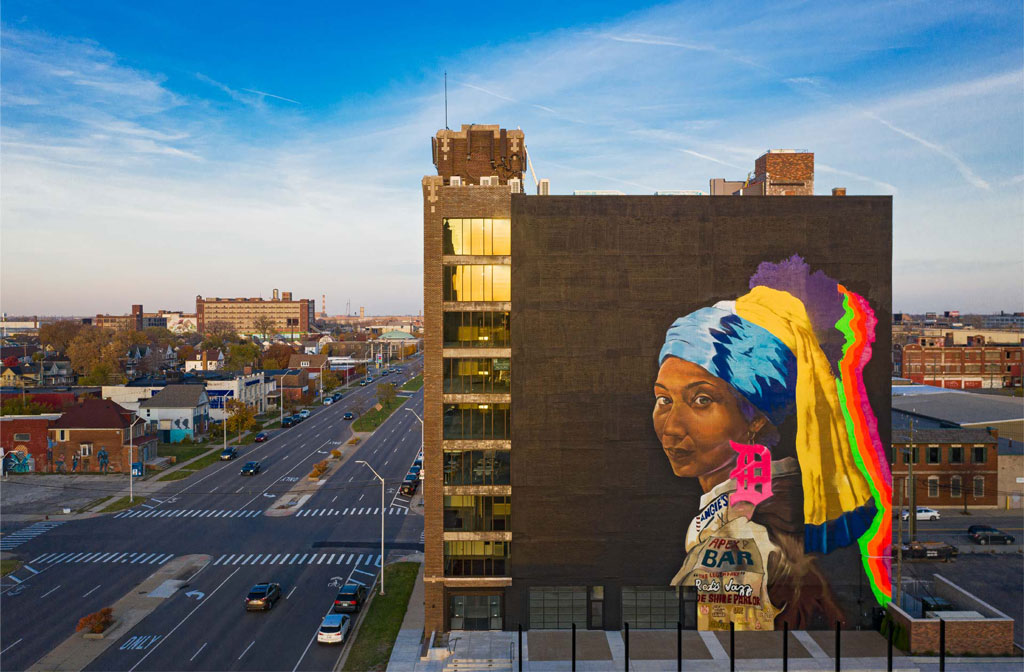
Girl with the D Earring mural; Source: Zoyes Creative
“Girl with the D Earring” mural; Source: Zoyes Creative


Sydney G. James is another Detroit artist who has contributed large-scale work to the city. A Black figurative painter and public art muralist, she pays homage to the city and emphasizes the deep connection between her art and Detroit, highlighting how murals serve as vibrant expressions of identity and community. Her work not only beautifies the urban landscape but also tells the stories of the people and the place that inspire her.

One of her most notable works is “Girl with the D Earring,” an 8,000 square-foot painting of a Black woman, on Grand Boulevard from Woodward Avenue into Milwaukee Junction. This work re-envisions Dutch artist Johannes Vermeer’s “Girl with a Pearl Earring.” “It’s one woman,” James told Hour Detroit. “But she represents Detroit in general. ‘Girl with the D Earring’ is a celebration of the city and a celebration of its people.”

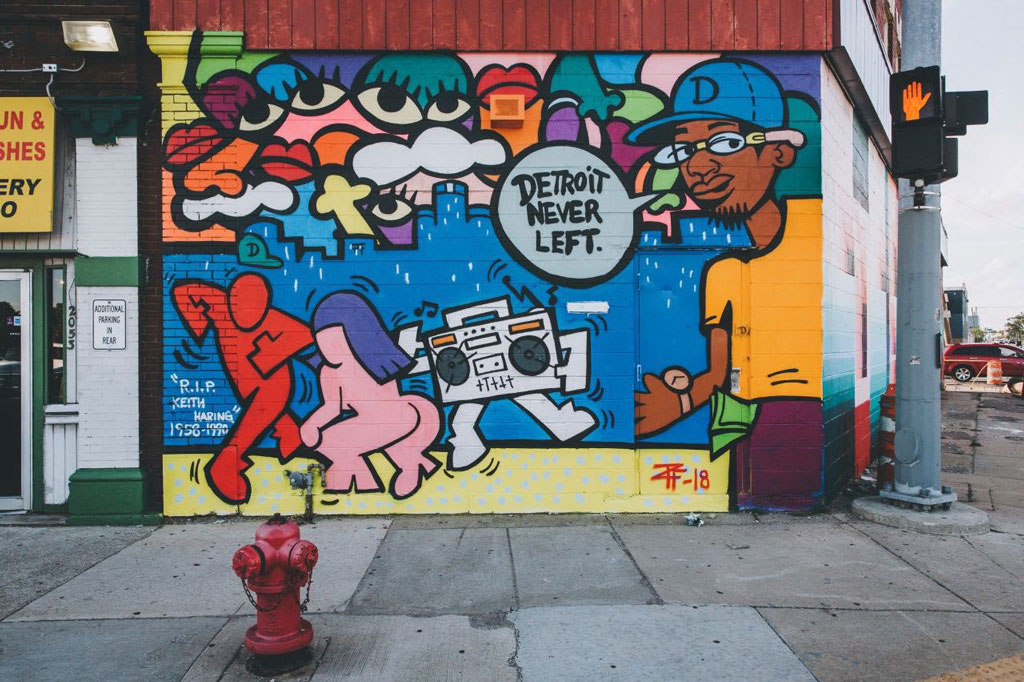
“Detroit Never Left” mural; Courtesy Sheefy McFly’s website


Musician and visual artist, Sheefy McFly’s “Detroit Never Left” mural, located at Gratiot and Chene near Detroit’s Historic Eastern Market, is a nod to the idea of Detroit having a “resurgence.” The painting depicts a party full of Detroiters: a man jitting—a dance style that was born in Detroit–with a woman twerking (a dance move perfected in New Orleans in the 1990s, with origins in West African dance), a radio, and a Black man wearing a Cartier watch and a blue “D” hat, exuding an authentic Detroit. McFly told The Michigan Chronicle that “anyone from Detroit that walks by can identify with the mural.” His style blends Neo-Expressionism and Pop Art with a Detroit twist that reflects the cultural and social dynamics of Detroit, capturing the city’s spirit and history.

Public art is a form of creative place making, which further deepens connection with places where we live, work, and play.

The vibrant murals of Detroit are more than just artistic expressions; they are a testament to the city’s rich history, diverse culture, and dynamic geography. By intertwining art with public spaces, the city’s murals not only beautify the landscape but also celebrate the unique cultural tapestry that defines this iconic American city.

Explore Detroit’s murals in the city’s interactive map. Filter by year, artist, name, or location.

    Share

Michigan Central Station: “The Sublime Object” of Detroit

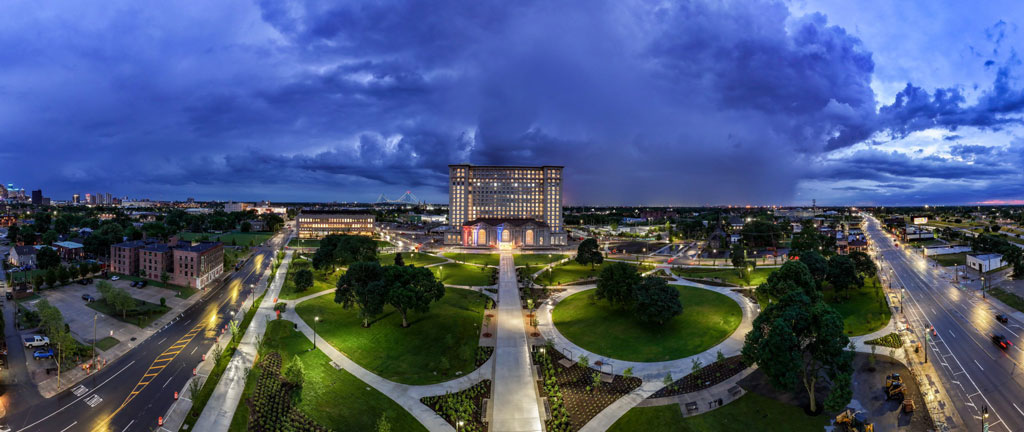
An exterior panoramic view of Michigan Central Station and surrounding areas in Detroit. Credit: Stephen McGee

In 2019, as the renovation of Michigan Central Station (MCS) in Detroit was getting underway, geographer Lucas Pohl captured some of the mythology and mystery that arose around the station in its more than forty years of decline:

One of the first lessons I learned while visiting Detroit is that you cannot speak about the city without facing its past. While this could be said of most places, it is a particular obsession of Detroiters to point to the city’s history in order to explain its present (and future). If you base Detroit solely on ‘what you see’, you do not get the ‘whole thing’.”

—Lucas Pohl,The sublime object of Detroit,” in Social and Cultural Geography (2021, Vol. 22, No. 8)

In 2015, Detroiters had described to Pohl the special place that the 1913 Beaux Arts-style Michigan Central Station has occupied in their minds—reflections of awe that speak from the last decade to its era of grandeur, its painful descent into ruins, and its 2024 reopening as a community and commercial hub once more:

Michigan Central Station is a special case. We have lots of skyscrapers that were empty for a long time, but the train station has a special place in the people’s hearts.”

“It’s just the One.”

“It’s a thing for everyone . . . I see it and I’m like, ‘Oh, I love Detroit.’”


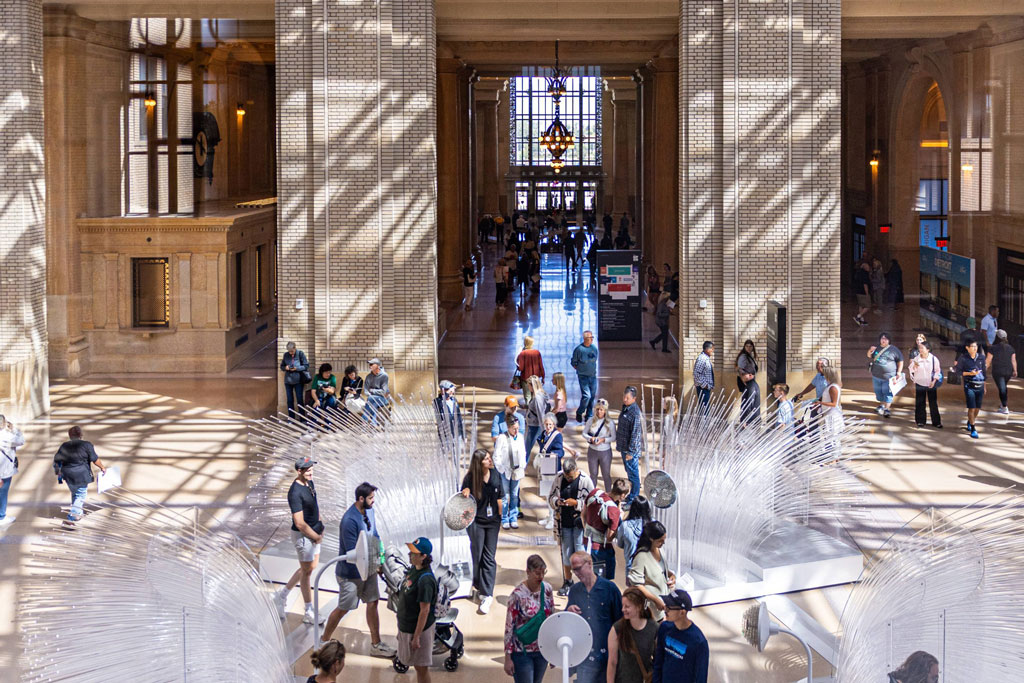
People walk through the interior hall of Michigan Central Station in Detroit. Credit: Stephanie Rhoades Hume, Michigan Center

New Life for the MCS

The recent renovation of the Michigan Central Station focuses on its future as a tech and mobility hub on 30 acres, with 1.2 million square feet of public and commercial space. Ford Motor Company was the lead on its renovation, with partners like Google and Newlab joining the State of Michigan and the City of Detroit. Yet this building also lives within more than 100 years of shared memories and history. Its presence in the public imagination remains a central element in its new life.

Just as there is plenty to remark on in the rebirth of the station, from the craftsmanship brought back to life to the careful planning for a mix of uses and inclusion of skills and jobs programming, Detroit historian Jamon Jordan also sheds light on the many reasons the station’s history is important to the city’s life.

On the grand reopening in June 2024, Jordan shared an op ed published in the Detroit Free Press, detailing the rich history of Michigan Central. From his childhood memories of the station in 1977, about a decade before it closed—many believed for good—Jordan traces back to the people, events, and stories that made Michigan Central a nerve center of city and Black history long before it became an emblem of decay during Detroit’s tough years at the end of the 20th century.

When the Erie Canal opened in 1825, Jordan recounts, it sparked a mass migration from the East Coast, either with Detroit as their destination, or through the city to Chicago. Starting in the 1830s, the railroad became a feature of the landscape, and the Michigan Central Railroad became a fixture by 1846.

One of the most consequential figures Jordan brings to life is Elijah McCoy, an African American engineer who began working for the Michigan Central Railroad in 1866. Born in Ontario, Canada, in 1844 to parents who escaped on the Underground Railroad, McCoy was trained in Scotland, but was “allowed only to be a lubricator and fireman on the railroad” because he was Black, says Jordan. This talented engineer was relegated to oiling the train’s moving parts and shoveling coal.

Undeterred, McCoy invented “an automatic lubricator that could oil the train’s moving parts as it was moving, eliminating the need for trains to make frequent stops,” says Jordan, thus gaining the last laugh and transforming the capacity of the railroad industry.

An era came to an end when the old 1884 Central Station was destroyed in a fire in 1913. The present building occupies a different site at 14th and Michigan. Until it closed in 1988–due to declining rail ridership nationwide and the attrition in both employers and residents in Detroit–its vast grandeur greeted thousands of travelers, including the hopeful members of the African American Great Migration. Many of them, migrating from the segregated South, had only dreamed of an arrival like this one, into a public train station without a single set of discriminating signs for “Whites” and “Coloreds.”

Jordan brings together touchstones of history through the station’s life, from international fame to personal connection: from Ossian Sweet to Joe Louis to Lucinda Ruffin—Jordan’s own grandmother.

Once, Michigan Central Station had 10 gates for trains, and its 18-story tower held 500 offices. In the station’s heyday in the 1940s, more than 4,000 passengers passed through each day. The six-year renovation preserves many of the original structures exterior and interior architectural details, and also addresses renovations at two nearby buildings, which will now house an innovation space called NewLab, and a mobility hub that incorporates greenspace, pedestrian, and bicycle connections. The result may well be a new Detroit place that is still worthy of Jacques Lacan’s somber definition of a “sublime object,” as Pohl describes it: “a remainder of loss that triggers a strong nostalgia,” yet that also can contribute to the city’s future.

Find out more about Detroit history from Black Scroll Network. Read an analysis of the fall and rise of Michigan Central in this article by Wayne State University’s Mila Puccini and Jeffrey Horner. 

Register today
    Share

AAG 2024 Annual Meeting PDF Program

    Share

AAG 2023 Annual Meeting PDF Program

    Share

AAG 2023 for Students

    Share